---
title: Power Cycling your Enphase System
description: Power cycling your enphase system, including the iBoard and battery
---
[Skip to content](https://knowledge-base.solarhub.net.au/power-cycling-your-enphase-system#main-content)

- [Customer Portal](https://441665238.hs-sites-ap1.com/tickets-view)
Open main navigation
Close main navigation
- [Customer Portal](https://441665238.hs-sites-ap1.com/tickets-view)
How can we help you?
- There are no suggestions because the search field is empty.
1. [SolarHub Knowledge Base](https://knowledge-base.solarhub.net.au/?hsLang=en-au)
2. [Troubleshooting](https://knowledge-base.solarhub.net.au/troubleshooting?hsLang=en-au)
3. [Enphase](https://knowledge-base.solarhub.net.au/troubleshooting?hsLang=en-au#enphase)
# Power Cycling your Enphase System
### Article Contents
**[Power Cycling your Enphase iBoard](https://knowledge-base.solarhub.net.au/power-cycling-your-enphase-system#iboard)**
**[Power Cycling your Enphase Battery](https://knowledge-base.solarhub.net.au/power-cycling-your-enphase-system#battery)**
### Power Cycling your Enphase iBoard
- Locate your Solar Distribution Board. Inside you will find a switch labelled "Main Switch Inverter Supply". Flick it into the OFF position.
- Wait for 5 minutes before continuing.
- Flick the "Main Switch Inverter Supply" into the ON position.
- See the videos below for a visual demonstration.
| | |
| --- | --- |
| **Turning OFF Enphase iBoard** | **Turning ON Enphase iBoard** |
### Power Cycling your Enphase Battery
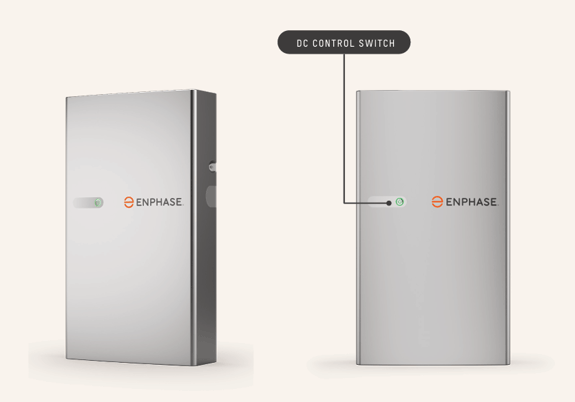
- If you are still experiencing issues within your system, it may be coming from your battery instead. The LED light on the front may turn a flashing red light. This just means that the DC is disconnected but there is still AC supply to the battery.
- To power cycle your battery, start by pressing the DC Control Switch located on the front of the unit to turn it OFF.
- Wait for 5 minutes then press the DC Control Switch again to turn it back ON. The LED light will start to flash yellow, indicating the starting up phase. Once startup is completed, your battery LED will return to either a solid green or blue light depending on the battery's charge.
**If you encounter any further issues during this process, [raise a support ticket](https://solarhub.net.au/raise-a-support-ticket/) with SolarHub’s Support and Service Team for further assistance.**
- [FAQs](https://knowledge-base.solarhub.net.au/faqs?hsLang=en-au#main-content)
- [General FAQs](https://knowledge-base.solarhub.net.au/faqs?hsLang=en-au#general-faqs)
- [Enphase](https://knowledge-base.solarhub.net.au/faqs?hsLang=en-au#enphase)
- [Fronius](https://knowledge-base.solarhub.net.au/faqs?hsLang=en-au#fronius)
- [Sigenergy](https://knowledge-base.solarhub.net.au/faqs?hsLang=en-au#sigenergy)
- [SolarEdge](https://knowledge-base.solarhub.net.au/faqs?hsLang=en-au#solaredge)
- [Tesla](https://knowledge-base.solarhub.net.au/faqs?hsLang=en-au#tesla)
- [Troubleshooting](https://knowledge-base.solarhub.net.au/troubleshooting?hsLang=en-au#main-content)
- [General Troubleshooting](https://knowledge-base.solarhub.net.au/troubleshooting?hsLang=en-au#general-troubleshooting)
- [Enphase](https://knowledge-base.solarhub.net.au/troubleshooting?hsLang=en-au#enphase)
- [Fronius](https://knowledge-base.solarhub.net.au/troubleshooting?hsLang=en-au#fronius)
- [Reposit](https://knowledge-base.solarhub.net.au/troubleshooting?hsLang=en-au#reposit)
- [Sigenergy](https://knowledge-base.solarhub.net.au/troubleshooting?hsLang=en-au#sigenergy)
- [SolarEdge](https://knowledge-base.solarhub.net.au/troubleshooting?hsLang=en-au#solaredge)
- [Tesla](https://knowledge-base.solarhub.net.au/troubleshooting?hsLang=en-au#tesla)
- [Sunpower](https://knowledge-base.solarhub.net.au/troubleshooting?hsLang=en-au#sunpower)
- [Sungrow](https://knowledge-base.solarhub.net.au/troubleshooting?hsLang=en-au#sungrow)
- [Solax](https://knowledge-base.solarhub.net.au/troubleshooting?hsLang=en-au#solax)
- [General](https://knowledge-base.solarhub.net.au/general?hsLang=en-au)
[](http://solarhub.net.au)
[mailto:email@email.com](mailto:email@email.com)
Copyright © 2025, SolarHub