---
title: Power Cycling your Sigenergy System
description: Power Cycling your Sigenergy System
---
[Skip to content](https://knowledge-base.solarhub.net.au/power-cycling-your-sigenergy-system#main-content)

- [Customer Portal](https://441665238.hs-sites-ap1.com/tickets-view)
Open main navigation
Close main navigation
- [Customer Portal](https://441665238.hs-sites-ap1.com/tickets-view)
How can we help you?
- There are no suggestions because the search field is empty.
1. [SolarHub Knowledge Base](https://knowledge-base.solarhub.net.au/?hsLang=en-au)
2. [Troubleshooting](https://knowledge-base.solarhub.net.au/troubleshooting?hsLang=en-au)
3. [Sigenergy](https://knowledge-base.solarhub.net.au/troubleshooting?hsLang=en-au#sigenergy)
# Power Cycling your Sigenergy System
### Article Contents
**[Video Demonstration](https://knowledge-base.solarhub.net.au/power-cycling-your-sigenergy-system#Video)**
**[Power Cycling Through the App](https://knowledge-base.solarhub.net.au/power-cycling-your-sigenergy-system#app)**
**[Manual Power Cycling](https://knowledge-base.solarhub.net.au/power-cycling-your-sigenergy-system#manual)**
### Video Demonstration
*Follow video from 0:00-2:15*
### Power Cycling Through the App
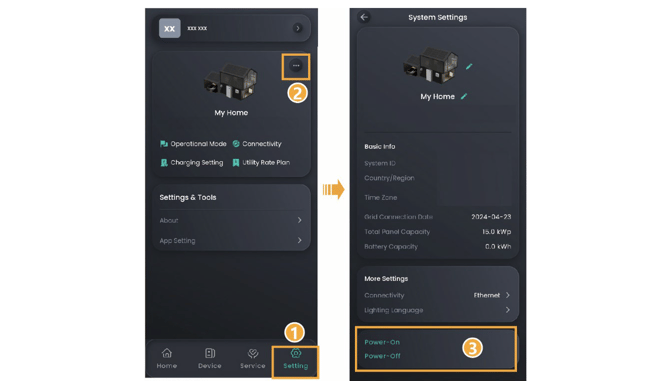
- Open the mySigen app. If you are required to login, your login credentials should’ve been provided during the system’s installation. If you can’t access your login credentials, contact us and we can help source them for you.
- At the far bottom of your screen (on the menu tab), click onto the settings tab.
- Click on the three dots at the top right of the page. This will take you to the internal settings of your home system.
- Scroll down the page until you see the Power-On and Power-Off options. Click the Power-Off button.
- **Wait at least 10 minutes before turning the system back on** (as recommended by the manufacturer). This allows the system time to reset.
- Click the Power-On button and after a short period, your system should be back online.
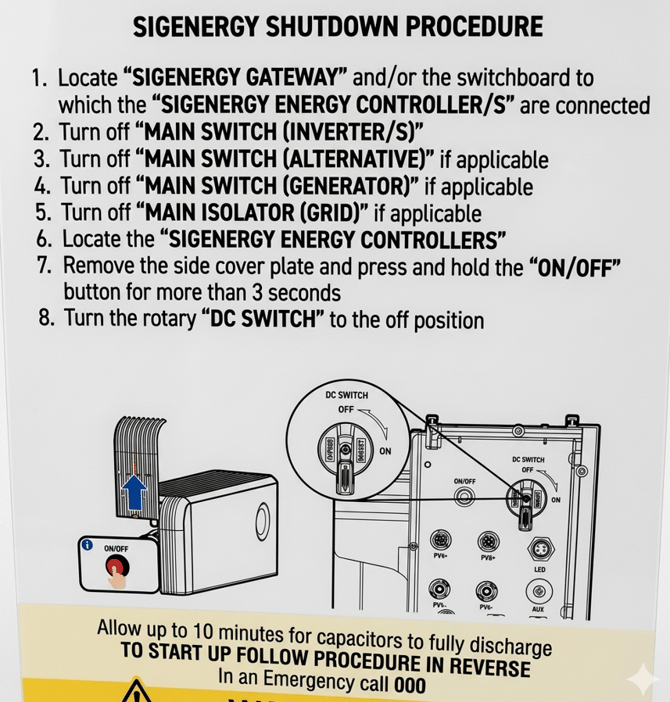
### Manual Power Cycling
**If you encounter any further issues during this process, [raise a support ticket](https://solarhub.net.au/raise-a-support-ticket/) with SolarHub’s Support and Service Team for further assistance.**
- [FAQs](https://knowledge-base.solarhub.net.au/faqs?hsLang=en-au#main-content)
- [General FAQs](https://knowledge-base.solarhub.net.au/faqs?hsLang=en-au#general-faqs)
- [Enphase](https://knowledge-base.solarhub.net.au/faqs?hsLang=en-au#enphase)
- [Fronius](https://knowledge-base.solarhub.net.au/faqs?hsLang=en-au#fronius)
- [Sigenergy](https://knowledge-base.solarhub.net.au/faqs?hsLang=en-au#sigenergy)
- [SolarEdge](https://knowledge-base.solarhub.net.au/faqs?hsLang=en-au#solaredge)
- [Tesla](https://knowledge-base.solarhub.net.au/faqs?hsLang=en-au#tesla)
- [Troubleshooting](https://knowledge-base.solarhub.net.au/troubleshooting?hsLang=en-au#main-content)
- [General Troubleshooting](https://knowledge-base.solarhub.net.au/troubleshooting?hsLang=en-au#general-troubleshooting)
- [Enphase](https://knowledge-base.solarhub.net.au/troubleshooting?hsLang=en-au#enphase)
- [Fronius](https://knowledge-base.solarhub.net.au/troubleshooting?hsLang=en-au#fronius)
- [Reposit](https://knowledge-base.solarhub.net.au/troubleshooting?hsLang=en-au#reposit)
- [Sigenergy](https://knowledge-base.solarhub.net.au/troubleshooting?hsLang=en-au#sigenergy)
- [SolarEdge](https://knowledge-base.solarhub.net.au/troubleshooting?hsLang=en-au#solaredge)
- [Tesla](https://knowledge-base.solarhub.net.au/troubleshooting?hsLang=en-au#tesla)
- [Sunpower](https://knowledge-base.solarhub.net.au/troubleshooting?hsLang=en-au#sunpower)
- [Sungrow](https://knowledge-base.solarhub.net.au/troubleshooting?hsLang=en-au#sungrow)
- [Solax](https://knowledge-base.solarhub.net.au/troubleshooting?hsLang=en-au#solax)
- [General](https://knowledge-base.solarhub.net.au/general?hsLang=en-au)
[](http://solarhub.net.au)
[mailto:email@email.com](mailto:email@email.com)
Copyright © 2025, SolarHub