Skip to content
English - Australia
  • There are no suggestions because the search field is empty.

Power Cycling your Tesla Powerwall 2

Article Contents

Video Demonstration

Power Cycling your Powerwall

Video Demonstration

Turning OFF Powerwall Turning ON Powerwall

Power Cycling your Powerwall 

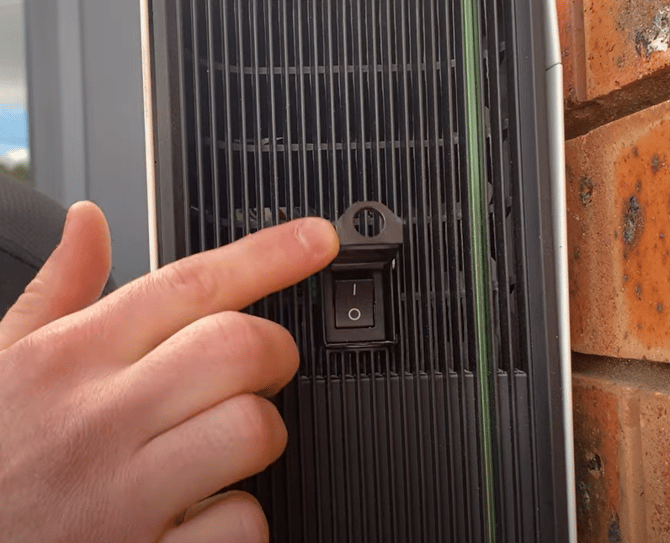
Step 1: Turning OFF the Powerwall

  • A small switch can be found on the right side of the battery.
  • Lift up the flap and flick it into the OFF position (as seen on the right).

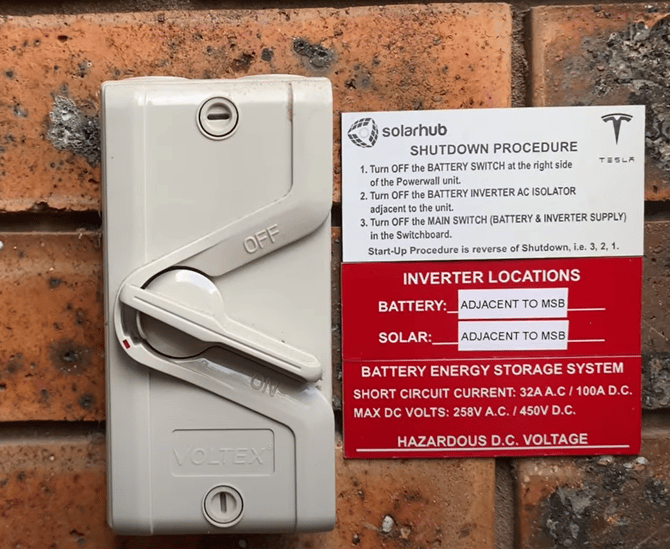
Step 2: Turning OFF AC Breaker

  • This switch will be found adjacent to your battery.
  • Once the switches from both step 1 and step 2 are switched off, wait 5 minutes before continuing. This will give the system time to reset.

Step 3: Complete the Previous Steps in Reverse Order

  • First, turn ON the AC Breaker.
  • Finally, turn ON the Powerwall.

If you encounter any further issues during this process, raise a support ticket with SolarHub’s Support and Service Team for further assistance.