---
title: Reconnecting your Sunpower Reserve to Wi-Fi
description: Reconnecting your Sunpower Reserve to Wi-Fi
---
[Skip to content](https://knowledge-base.solarhub.net.au/reconnecting-your-sunpower-reserve-to-wi-fi#main-content)

- [Customer Portal](https://441665238.hs-sites-ap1.com/tickets-view)
Open main navigation
Close main navigation
- [Customer Portal](https://441665238.hs-sites-ap1.com/tickets-view)
How can we help you?
- There are no suggestions because the search field is empty.
1. [SolarHub Knowledge Base](https://knowledge-base.solarhub.net.au/?hsLang=en-au)
2. [Troubleshooting](https://knowledge-base.solarhub.net.au/troubleshooting?hsLang=en-au)
3. [Sunpower](https://knowledge-base.solarhub.net.au/troubleshooting?hsLang=en-au#sunpower)
# Reconnecting your Sunpower Reserve to Wi-Fi
### 
### Article Contents
**[Initial Steps](https://knowledge-base.solarhub.net.au/reconnecting-your-sunpower-reserve-to-wi-fi#initial)**
[**Connecting Sunpower Reserve to Wi-Fi**](https://knowledge-base.solarhub.net.au/reconnecting-your-sunpower-reserve-to-wi-fi#connecting)
### Initial Steps
- **Ensure Correct Wi-Fi Connection:** All inverter connections require a 2.4GHz home internet connection. If your current internet plan and router only allow 5.0GHz connection, contact your internet provider to resolve this issue.
- **Wi-Fi Strength:** Ensure that the connection to your inverter is strong enough to operate. If your connection isn't strong, you may need to consider the use of a Wi-Fi extender. There are two methods of testing your connection:
- **Quick Method:** Seeing how many bars of internet connection your smartphone or tablet receives when standing next to your inverter.
- **Accurate Method:** Measuring your connection strength via website or app. We personally recommend using [WiFiman by Ubiquiti](https://wifiman.com/).
### Connecting Sunpower Reserve to Wi-Fi
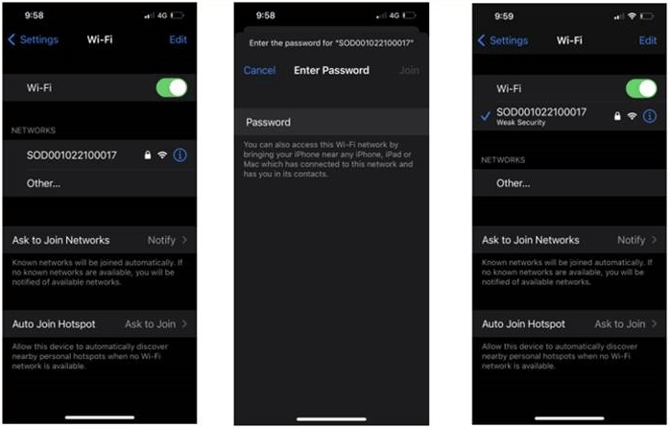
| **Step 1: Connecting your Device to the Inverter ** - On your smartphone or tablet, go into your settings and turn off your mobile data. - If not already on, turn on your smart device's Wi-Fi. - In the networks section, join the inverters Wi-Fi network. This will be called "SODXXXXXXXXXXX" (unique to your system's serial number). - Enter the password '12345678' and confirm. You should now be connected. | **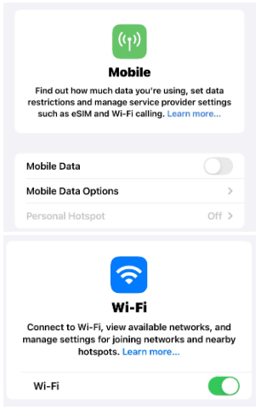** |
| --- | --- |
|  | |
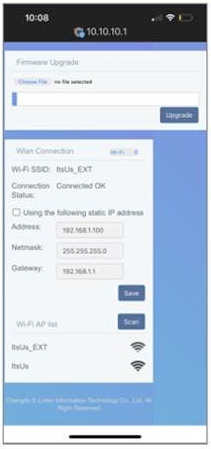
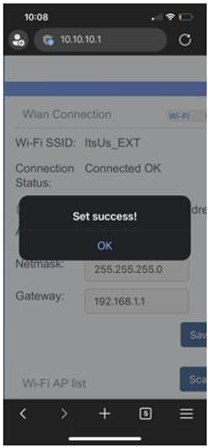
| **Step 2: Connecting to your Home Network** - In your internet browser, look up the following IP address: 10.10.10.1. This will take you to a Wi-Fi configuration. - Scroll down the page and press the 'Scan' button. This will detect your home network. - Connect to your home network. once confirmed, disconnect from the inverter's Wi-Fi. | |
|  |  |
**If this process is unsuccessful, [raise a support ticket](https://solarhub.net.au/raise-a-support-ticket/) with SolarHub’s Support and Service Team for further assistance.**
- [FAQs](https://knowledge-base.solarhub.net.au/faqs?hsLang=en-au#main-content)
- [General FAQs](https://knowledge-base.solarhub.net.au/faqs?hsLang=en-au#general-faqs)
- [Enphase](https://knowledge-base.solarhub.net.au/faqs?hsLang=en-au#enphase)
- [Fronius](https://knowledge-base.solarhub.net.au/faqs?hsLang=en-au#fronius)
- [Sigenergy](https://knowledge-base.solarhub.net.au/faqs?hsLang=en-au#sigenergy)
- [SolarEdge](https://knowledge-base.solarhub.net.au/faqs?hsLang=en-au#solaredge)
- [Tesla](https://knowledge-base.solarhub.net.au/faqs?hsLang=en-au#tesla)
- [Troubleshooting](https://knowledge-base.solarhub.net.au/troubleshooting?hsLang=en-au#main-content)
- [General Troubleshooting](https://knowledge-base.solarhub.net.au/troubleshooting?hsLang=en-au#general-troubleshooting)
- [Enphase](https://knowledge-base.solarhub.net.au/troubleshooting?hsLang=en-au#enphase)
- [Fronius](https://knowledge-base.solarhub.net.au/troubleshooting?hsLang=en-au#fronius)
- [Reposit](https://knowledge-base.solarhub.net.au/troubleshooting?hsLang=en-au#reposit)
- [Sigenergy](https://knowledge-base.solarhub.net.au/troubleshooting?hsLang=en-au#sigenergy)
- [SolarEdge](https://knowledge-base.solarhub.net.au/troubleshooting?hsLang=en-au#solaredge)
- [Tesla](https://knowledge-base.solarhub.net.au/troubleshooting?hsLang=en-au#tesla)
- [Sunpower](https://knowledge-base.solarhub.net.au/troubleshooting?hsLang=en-au#sunpower)
- [Sungrow](https://knowledge-base.solarhub.net.au/troubleshooting?hsLang=en-au#sungrow)
- [Solax](https://knowledge-base.solarhub.net.au/troubleshooting?hsLang=en-au#solax)
- [General](https://knowledge-base.solarhub.net.au/general?hsLang=en-au)
[](http://solarhub.net.au)
[mailto:email@email.com](mailto:email@email.com)
Copyright © 2025, SolarHub