
 |
Article Contents
Primo/Symo Snap Inverter
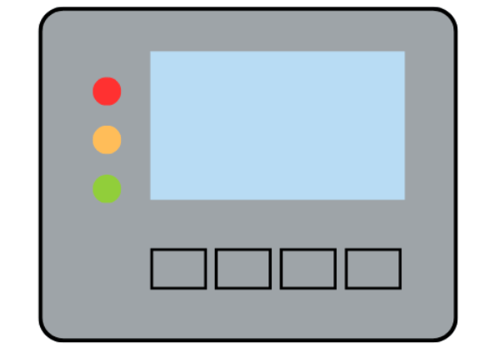
General status LED (red): This will be where most errors can be monitored. This LED will activate if:
- A status message is being displayed on the monitor.
- The process of feeding energy into the grid is interrupted.
- The inverter is waiting for an error to be rectified.
Startup LED (orange): The main light when the system isn’t handling energy. This LED will activate if:
- The inverter is in its automatic startup or self-test phase (as soon after sunrise as the solar modules are delivering sufficient power).
- The inverter has been switched to Standby mode in the Setup menu (= feeding energy into the grid switched off manually).
- The inverter software is being updated.
Operating status LED (green): This LED should be on during majority of the day. It will activate if:
- The PV system is working correctly after the inverter's automatic startup phase.
- All the time while energy is being fed into the grid.
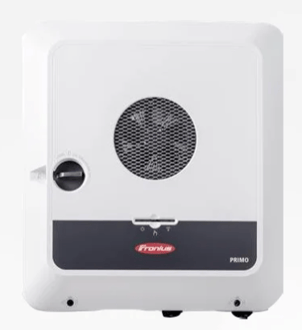
Primo/Symo Gen-24 Inverter
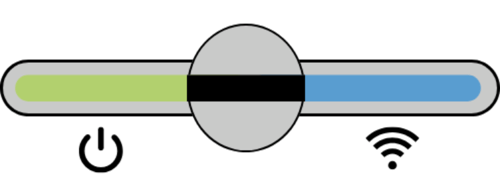
Power LED
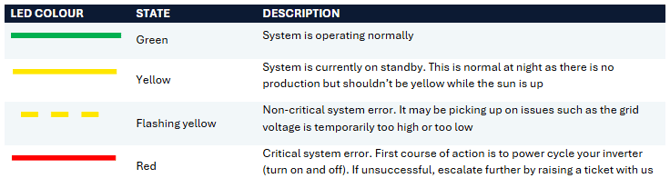
Network Connection LED

If you have any additional enquiries or if you’re still unsure, feel free to contact us by raising a Support Ticket and we can investigate your issue further.