---
title: Understanding LED status and Alerts: SolarEdge
description: Understanding SolarEdge LED status and Alerts
---
[Skip to content](https://knowledge-base.solarhub.net.au/understanding-led-status-and-alerts-solaredge#main-content)

- [Customer Portal](https://441665238.hs-sites-ap1.com/tickets-view)
Open main navigation
Close main navigation
- [Customer Portal](https://441665238.hs-sites-ap1.com/tickets-view)
How can we help you?
- There are no suggestions because the search field is empty.
1. [SolarHub Knowledge Base](https://knowledge-base.solarhub.net.au/?hsLang=en-au)
2. [FAQs](https://knowledge-base.solarhub.net.au/faqs?hsLang=en-au)
3. [SolarEdge](https://knowledge-base.solarhub.net.au/faqs?hsLang=en-au#solaredge)
# Understanding LED status and Alerts: SolarEdge
### Article Contents
**[LED Status: Understanding the Colours](https://knowledge-base.solarhub.net.au/understanding-led-status-and-alerts-solaredge#colours)**
**[LED Status: Common Combinations](https://knowledge-base.solarhub.net.au/understanding-led-status-and-alerts-solaredge#comb)**
[**Error Codes on Screened Inverters**](https://knowledge-base.solarhub.net.au/understanding-led-status-and-alerts-solaredge#error)
**[Troubleshooting](https://knowledge-base.solarhub.net.au/understanding-led-status-and-alerts-solaredge#trbles)**
### LED Status: Understanding the Colours
| **Green LED: Performance Status** - **Solid colour:** AC is connected, and the system is producing. - **Blinking:** AC is connected but the system is not producing. Commonly means your power optimizers are not paired. - **Off:** There is no AC power. | 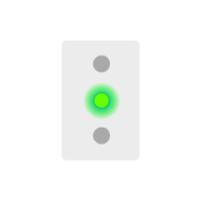 |
| --- | --- |
| **Blue LED: Communication Status** - **Solid colour:** The inverter is communicating with your monitoring platform. - **Blinking:** Check common combinations. - **Off:** No communication with your system. | 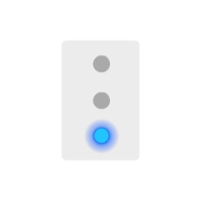 |
| **Red LED: System Status** - **Solid colour:** There is currently a system error. - **Blinking:** Check common combinations. - **Off:** System operating without faults. | 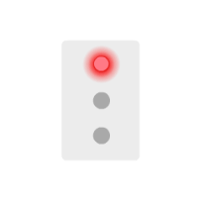 |
### LED Status: Common Combinations
| **All Lights Blinking:** System is currently pairing. | 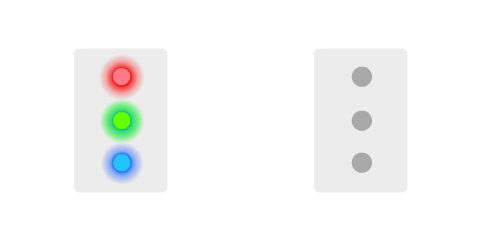 |
| --- | --- |
| **All Lights Solid:** Inverter is currently in configuration mode or is currently rebooting. | **** |
| **Green and Blue Blinking:** Wake-up/Grid Monitoring mode. This should only persist for 5 minutes. If it continues, escalate further. | 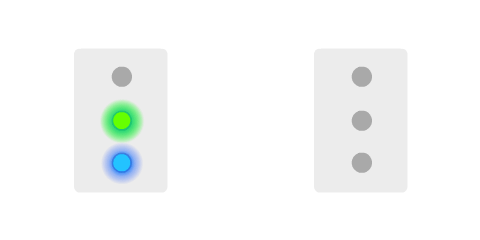 |
| **Red and Green Blinking:** - **If Inverter is ON: **Potential Induced Degradation (PID) Rectifier fault. - **If Inverter is OFF: **DC is currently at an unsafe level. | **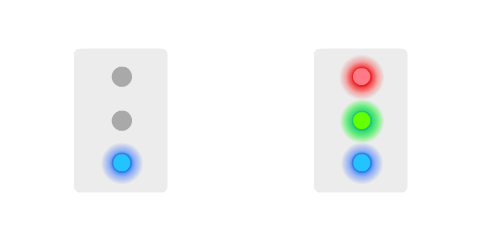** |
| **All Lights Blinking in Sequence:** Inverter is currently undergoing a firmware update. | 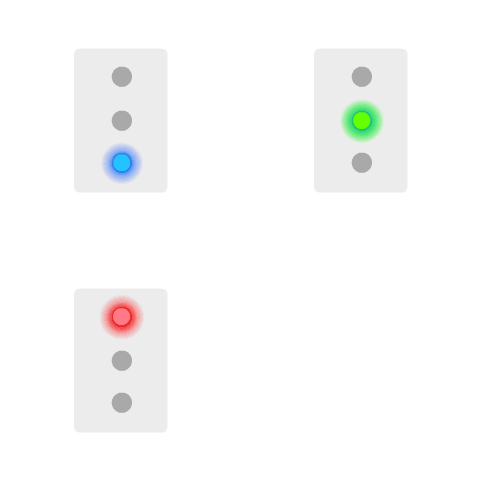 |
### Error Codes on Screened Inverters
Many different alerts can appear on your SolarEdge Inverter. For a full comprehensive list on SolarEdge error codes and their suggested immediate response, follow the guide below:
- [SolarEdge Error Codes](https://knowledge-center.solaredge.com/sites/kc/files/se-inverter-installation-guide-error-codes.pdf)
### Troubleshooting
**Blue LED OFF:** Your system is most likely no longer connected to Wi-Fi. This can occur due to a change in home Wi-Fi network or an unexpected connection dropout. To fix this issue, try reestablishing connection to your inverter. Follow the articles below for model specific instructions.
- [Screenless SolarEdge Inverter](https://knowledge-base.solarhub.net.au/reconnecting-a-screenless-solaredge-inverter-to-wifi?hsLang=en-au)
- Screened SolarEdge Inverter
**Green LED OFF:** Power to your inverter may be interrupted. Ensure that the ON/OFF/P toggle switch is in the ON position, your AC isolator is in the ON position, and your DC isolating is in the ON position. If all is correct, try turning your system on and off. Follow the instructions provided on your inverter for the safest procedure to power cycle your system or follow the below article.
- Power Cycling your SolarEdge Inverter
**Red LED ON or blinking:** This typically represents a more serious issue in your system. Attempt to power cycle your inverter first. If the problem still persists, raise a support ticket with the link below.
**If you encounter any further issues or have an enquiry, please refer to the [SolarEdge support page](https://www.solaredge.com/en/support/system-owner/configuring-inverter-communication) or [raise a support ticket](https://solarhub.net.au/raise-a-support-ticket/) with SolarHub’s Support and Service Team for further assistance.**
- [FAQs](https://knowledge-base.solarhub.net.au/faqs?hsLang=en-au#main-content)
- [General FAQs](https://knowledge-base.solarhub.net.au/faqs?hsLang=en-au#general-faqs)
- [Enphase](https://knowledge-base.solarhub.net.au/faqs?hsLang=en-au#enphase)
- [Fronius](https://knowledge-base.solarhub.net.au/faqs?hsLang=en-au#fronius)
- [Sigenergy](https://knowledge-base.solarhub.net.au/faqs?hsLang=en-au#sigenergy)
- [SolarEdge](https://knowledge-base.solarhub.net.au/faqs?hsLang=en-au#solaredge)
- [Tesla](https://knowledge-base.solarhub.net.au/faqs?hsLang=en-au#tesla)
- [Troubleshooting](https://knowledge-base.solarhub.net.au/troubleshooting?hsLang=en-au#main-content)
- [General Troubleshooting](https://knowledge-base.solarhub.net.au/troubleshooting?hsLang=en-au#general-troubleshooting)
- [Enphase](https://knowledge-base.solarhub.net.au/troubleshooting?hsLang=en-au#enphase)
- [Fronius](https://knowledge-base.solarhub.net.au/troubleshooting?hsLang=en-au#fronius)
- [Reposit](https://knowledge-base.solarhub.net.au/troubleshooting?hsLang=en-au#reposit)
- [Sigenergy](https://knowledge-base.solarhub.net.au/troubleshooting?hsLang=en-au#sigenergy)
- [SolarEdge](https://knowledge-base.solarhub.net.au/troubleshooting?hsLang=en-au#solaredge)
- [Tesla](https://knowledge-base.solarhub.net.au/troubleshooting?hsLang=en-au#tesla)
- [Sunpower](https://knowledge-base.solarhub.net.au/troubleshooting?hsLang=en-au#sunpower)
- [Sungrow](https://knowledge-base.solarhub.net.au/troubleshooting?hsLang=en-au#sungrow)
- [Solax](https://knowledge-base.solarhub.net.au/troubleshooting?hsLang=en-au#solax)
- [General](https://knowledge-base.solarhub.net.au/general?hsLang=en-au)
[](http://solarhub.net.au)
[mailto:email@email.com](mailto:email@email.com)
Copyright © 2025, SolarHub