
Article Contents
Overview
The mySigen app is a smart energy management platform designed for Sigenergy systems. It allows you to monitor your solar production, battery storage, energy consumption, and grid interaction in real time. With easy-to-read charts and device insights, the app helps you track performance, measure savings, and manage your home’s energy more efficiently.
Initial Steps
- Downloading the mySigen App: If you haven’t already, download and install the mySigen app on your smartphone or tablet from the App Store or Google Play Store. If you don’t know your login credentials, please raise a support ticket with SolarHub and we will assist you.
Front/System page
When you first log in to the mySigen app, you will be greeted by the default front page. This is also called the System page. This page offers many useful features for reading your energy production, consumption and even your system's profits. Here’s a breakdown for each starting from the top of the page and working our way down.
|
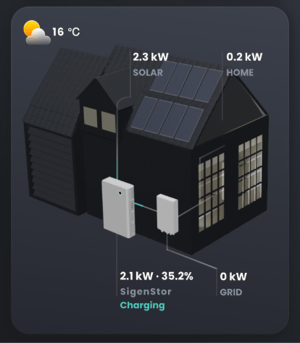
Energy Flow Breakdown: Visual representation of the current energy flow within your home. The diagram first represents the energy that is currently being generated by your solar. Your energy produced then flows into your battery (represented by its charging energy demand and current capacity) and system gateway. From here Your energy will flow in two main directions: into your home or to the grid. Both pathways are given a numerical value to represent how much energy is going into each. |
 |
|
|
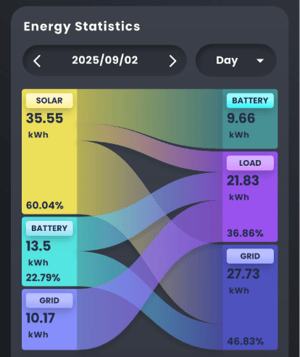
Energy statistics: This diagram shows how energy is distributed within a household. At first glance, the graph can seem confusing. The left column represents the sources of energy (solar, battery, and grid). The right column shows where the energy is delivered (battery, load, and grid). The middle section illustrates how different energy sources are split across your system. For example, the diagram on the left shows that solar production contributes primarily to charging the battery, partially to the household load, and mostly to exporting energy back to the grid. The battery discharges to support the household load and also supplies energy back to the grid. Energy drawn from the grid covers any household demand not met by solar or the battery. |
|
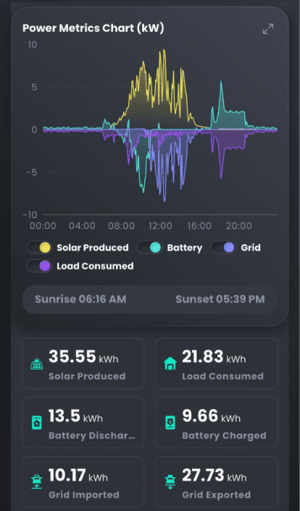
Power Metrics Chart: This chart provides a breakdown of your production versus your consumption. Anything above the line represents energy being supplied, while anything below the line represents energy being used. Here’s a breakdown of each component:
|
|
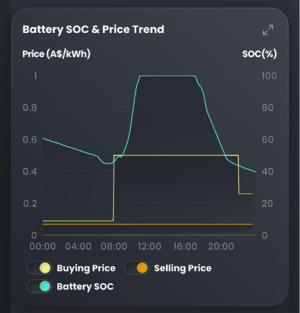 |
Battery State of Charge & Price Trend: This graph is multi-purpose. Here's a breakdown of each chart element:
|
|
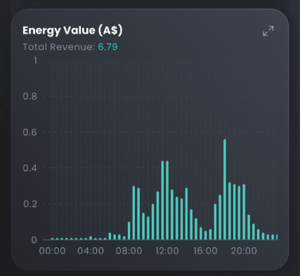
Energy Value: If the gross revenue of the energy you export to the grid is higher than the cost of drawing energy from the grid, your system will generate a profit. This chart shows how profitable your household is over the selected time period.
|
 |
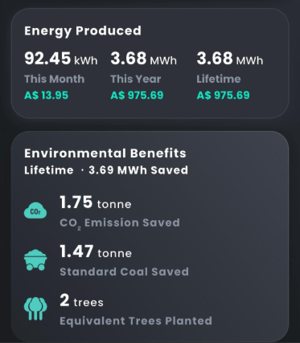 |
Energy produced: Provides figures for the amount of energy your system has produced over different historical time periods (month, year and lifetime). This section also provides insight to your overall profits during these time periods. Environmental benefits: A short summary of your system’s environmental impact, including reductions in CO₂ emissions, reduction in coal used and the equivalent number of trees planted. |
Device Page
At the top of your screen, click the Device tab. This will open up information about your installed devices. This includes device specifications, serial numbers and information into the current status of each component.
|
Your Sigenergy Battery: This section provides an overview of your battery. Since Sigenergy is a modular system, you may have more than one battery. You can monitor each battery’s current charge (typically equal across all units), charging and discharging rates, capacity, and average operating temperature as well as other specifications. These details can help diagnose potential issues. If you suspect a problem with your system, review these indicators for any irregularities. A power-off feature is also available. Use this only if instructed to do so in the event of a critical system issue. |
 |
Additional Devices (PV Panel, Energy Gateway): This tab allows you to monitor additional devices, view their specifications, and track energy usage. Commonly, you’ll find details about your PV panel array and your energy gateway. If your home system also includes inverters or other products not associated with the Sigenergy brand, they will appear here as well.
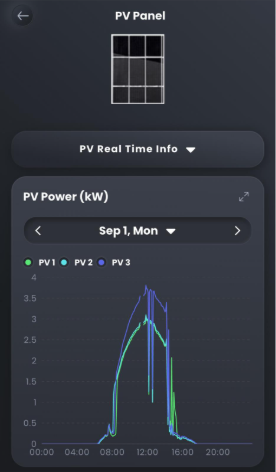
The PV Panel section provides an additional daily graph that shows the energy production of each panel string. The Gateway section includes options for enabling off-grid mode, which is most useful during a blackout. While this feature can be tested to see how your system would operate in the event of a blackout, it is automatically enabled in these circumstances. It's recommended not to leave this setting as it is.
 |
 |
If you have any additional enquiries or if you’re still unsure, feel free to contact us by raising a Support Ticket and we can investigate your issue further.