---
title: "Understanding the App: Tesla"
description: Understanding the Tesla Energy app
---
[Skip to content](https://knowledge-base.solarhub.net.au/understanding-the-app-tesla#main-content)

- [Customer Portal](https://441665238.hs-sites-ap1.com/tickets-view)
Open main navigation
Close main navigation
- [Customer Portal](https://441665238.hs-sites-ap1.com/tickets-view)
How can we help you?
- There are no suggestions because the search field is empty.
1. [SolarHub Knowledge Base](https://knowledge-base.solarhub.net.au/?hsLang=en-au)
2. [FAQs](https://knowledge-base.solarhub.net.au/faqs?hsLang=en-au)
3. [Tesla](https://knowledge-base.solarhub.net.au/faqs?hsLang=en-au#tesla)
# Understanding the App: Tesla
### Article Contents
**[Initial Steps](https://knowledge-base.solarhub.net.au/understanding-the-app-tesla#intial)**
**[Home Page](https://knowledge-base.solarhub.net.au/understanding-the-app-tesla#home)**
**[Energy Page](https://knowledge-base.solarhub.net.au/understanding-the-app-tesla#energy)**
**[Impact Page](https://knowledge-base.solarhub.net.au/understanding-the-app-tesla#impact)**
**[Settings Page](https://knowledge-base.solarhub.net.au/understanding-the-app-tesla#settings)**
### Initial Steps
- **Downloading the Tesla App: **If you haven’t already, download and install the Tesla app on your smartphone or tablet from the [App Store](https://apps.apple.com/au/app/tesla/id582007913) or [Google Play Store](https://play.google.com/store/apps/details?id=com.sigen.sigen_app&hl=en). If you don’t know your login credentials, please [raise a support ticket](https://solarhub.net.au/raise-a-support-ticket/) with SolarHub and we will assist you.
|  |  |
| --- | --- |
| ### **Google Play Store** | ### **Apple App Store** |
### Home Page
| **Energy Flow Breakdown:** Visual representation of the current energy flow within your home. The diagram first represents the energy that is currently being generated by your solar. Your energy produced then flows into your battery (represented by its charging energy demand and current capacity) and system gateway. From here, your energy will flow in two main directions: into your home or to the grid. Both pathways are given a numerical value to represent how much energy is going into each. The home page is also your navigation tool for the app, this can forward you towards energy data, impact data, as well as changing any settings if necessary. | 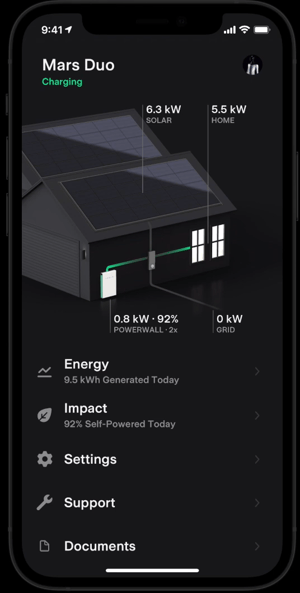 |
| --- | --- |
### Energy Page
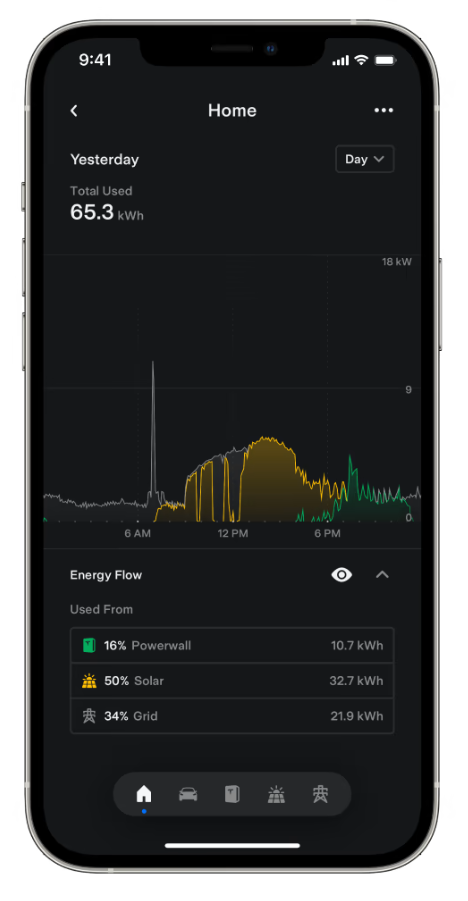
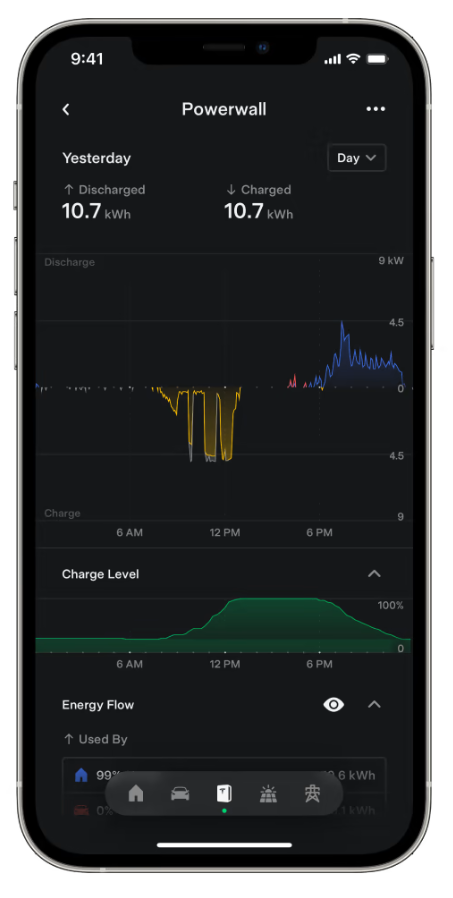
The energy tab is split into 5 main sections. For each section, the app provides you with an overview of the systems energy consumption and where the energy is being used. Grey represents power provided by the grid, yellow represents provided by your solar array, and green is energy being discharged from your battery.
- **Home: **Your overall consumption of your household for a specified time period.
- **Vehicle:** If you have an EV charger incorporated in your system, this represents the total charge that has gone into your vehicle.
- **Powerwall:** This splits into two sections. The first is the charging/discharging rate of your battery. If it's above the line, it's providing energy to either your home or EV. If it's below the line, it is currently charging. The second section is a timeline of your battery's charge over the selected period.
- **Solar:** Overview of solar production and where it is consumed.
- **Grid:** Overview of how your system integrates with the grid. If it's above the line, energy is being imported from the grid. If it's below the line, energy is being exported to the grid.
|  |  |  |
| --- | --- | --- |
### Impact Page
| **Self-Powered:** Breakdown of what percentage of energy consumed in your household comes from solar and from the grid (the larger the percentage, the more independent your system is). **Solar Value:** If the gross revenue of the energy you export to the grid is higher than the cost of drawing energy from the grid, your system will generate a profit. This chart shows how profitable your household is over the selected time period. | 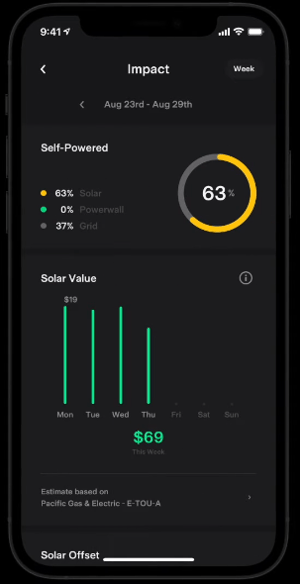 |
| --- | --- |
| 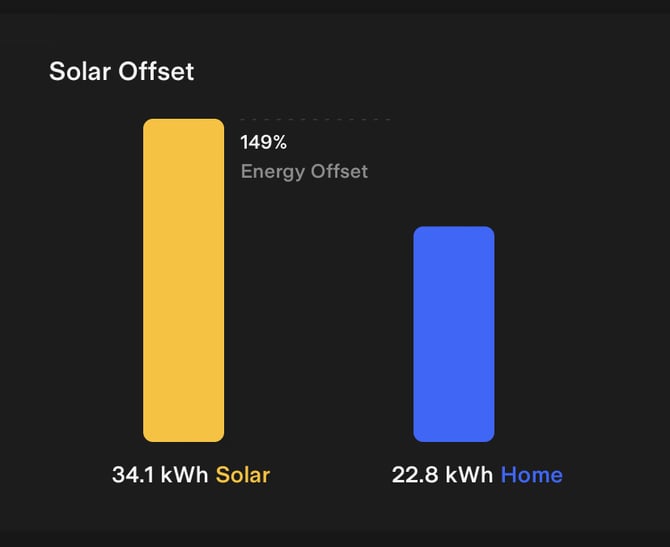 | **Solar Offset:** Display of your solar production against your home consumption. The energy offset value can be higher than 100% as this indicates that your system is producing more during a selected time period than what you are consuming. |
| **Time-of-Use:** Displays what your consumption is in different periods during the day. Each tab also provides a breakdown of where energy is being drawn from. | 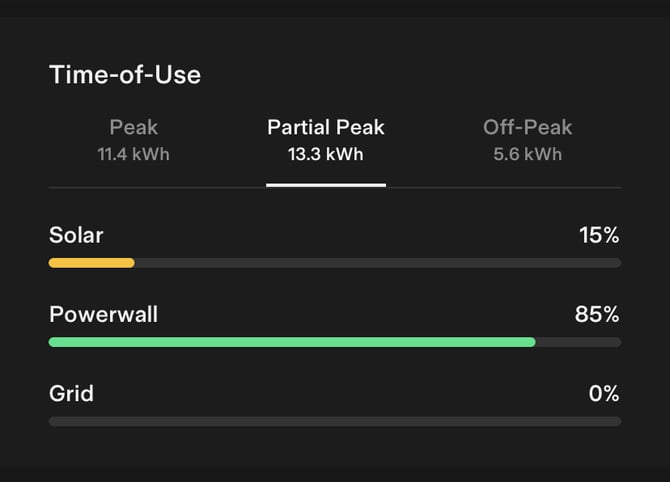 |
|  | **Backup History:** Displays events in which your Powerwall has powered your home during a grid outage. This includes the total length of time it has been operational during a selected period of time, as well as the longest period your Powerwall has operated during a grid outage. |
### Settings Page
Within the settings tab, you will be able to see your current operational settings. This includes your Powerwall's battery reserve in case of a grid outage, your system's current method of charging your battery (the default is through excess solar not being consumed) and your current energy rates. Whilst you can edit and customise these settings to your liking, it's recommended to keep these options on their default state as this mode is designed to be the most optimal option for your system.
If you want to operate your Powerwall in Time-of-Use mode, be sure that you have **[set your energy plan rates properly](https://www.tesla.com/en_au/support/energy/powerwall/mobile-app/time-based-control-user-guide)**, otherwise the battery may behave differently than expected.
**If you have any additional enquiries or if you’re still unsure, feel free to contact us by raising a [Support Ticket](https://solarhub.net.au/raise-a-support-ticket/) and we can investigate your issue further. **
- [FAQs](https://knowledge-base.solarhub.net.au/faqs?hsLang=en-au#main-content)
- [General FAQs](https://knowledge-base.solarhub.net.au/faqs?hsLang=en-au#general-faqs)
- [Enphase](https://knowledge-base.solarhub.net.au/faqs?hsLang=en-au#enphase)
- [Fronius](https://knowledge-base.solarhub.net.au/faqs?hsLang=en-au#fronius)
- [Sigenergy](https://knowledge-base.solarhub.net.au/faqs?hsLang=en-au#sigenergy)
- [SolarEdge](https://knowledge-base.solarhub.net.au/faqs?hsLang=en-au#solaredge)
- [Tesla](https://knowledge-base.solarhub.net.au/faqs?hsLang=en-au#tesla)
- [Troubleshooting](https://knowledge-base.solarhub.net.au/troubleshooting?hsLang=en-au#main-content)
- [General Troubleshooting](https://knowledge-base.solarhub.net.au/troubleshooting?hsLang=en-au#general-troubleshooting)
- [Enphase](https://knowledge-base.solarhub.net.au/troubleshooting?hsLang=en-au#enphase)
- [Fronius](https://knowledge-base.solarhub.net.au/troubleshooting?hsLang=en-au#fronius)
- [Reposit](https://knowledge-base.solarhub.net.au/troubleshooting?hsLang=en-au#reposit)
- [Sigenergy](https://knowledge-base.solarhub.net.au/troubleshooting?hsLang=en-au#sigenergy)
- [SolarEdge](https://knowledge-base.solarhub.net.au/troubleshooting?hsLang=en-au#solaredge)
- [Tesla](https://knowledge-base.solarhub.net.au/troubleshooting?hsLang=en-au#tesla)
- [Sunpower](https://knowledge-base.solarhub.net.au/troubleshooting?hsLang=en-au#sunpower)
- [Sungrow](https://knowledge-base.solarhub.net.au/troubleshooting?hsLang=en-au#sungrow)
- [Solax](https://knowledge-base.solarhub.net.au/troubleshooting?hsLang=en-au#solax)
- [General](https://knowledge-base.solarhub.net.au/general?hsLang=en-au)
[](http://solarhub.net.au)
[mailto:email@email.com](mailto:email@email.com)
Copyright © 2025, SolarHub